হোয়াটসঅ্যাপে AI অটো রিপ্লাই: বাংলায় ২৪ ঘণ্টা কাস্টমারের উত্তর দিন
রাতে বা ব্যস্ত সময়ে কাস্টমারের মেসেজের উত্তর দিতে দেরি হলে বিক্রি হাতছাড়া হয়। দেখুন কীভাবে AI আপনার নিজের তথ্য থেকে বাংলায় সঙ্গে সঙ্গে উত্তর দেয়।
Read moreHappyInAI · Sep 1, 2025 · 7 min read
In the world of digital marketing, text is powerful, but visuals are king. While a standard text message on WhatsApp can get your point across, a message that arrives with a vibrant image, an informative PDF brochure, or a quick video tutorial is on a completely different level. It grabs attention, delivers more value, and drives significantly higher engagement.
But for businesses, this presents a huge logistical nightmare. How do you send a personalized message and an attachment—like an invoice, a product catalog, or an event flyer—to hundreds or thousands of contacts without spending days manually clicking “attach file” for every single chat?
The answer lies in smart automation. This ultimate guide will show you exactly how to send WhatsApp bulk messages with attachments, transforming your outreach from simple text blasts into rich, multimedia conversations. We’ll explore the strategy, the safety precautions, and the tools, like the HappyInAI WhatsApp Bulk Message Sender, that make it all possible.
Before we dive into the “how,” let’s solidify the “why.” Integrating attachments into your WhatsApp strategy isn’t just a gimmick; it’s a game-changer that can fundamentally improve your campaign performance.
The human brain processes images 60,000 times faster than text. When a user receives a message with an image of your new product, a GIF of a special offer, or a short video tutorial, it’s instantly more engaging and memorable than text alone. This is perfect for:
Attachments allow you to provide direct, tangible value to your recipients. Instead of sending a link and hoping they click it, you can place the information directly in their hands. This is incredibly effective for:
Sending a professionally designed PDF quote or a branded company brochure looks far more credible than a simple text message. It shows that you are an established, serious business, which is crucial for building trust with new leads and reinforcing it with existing customers.
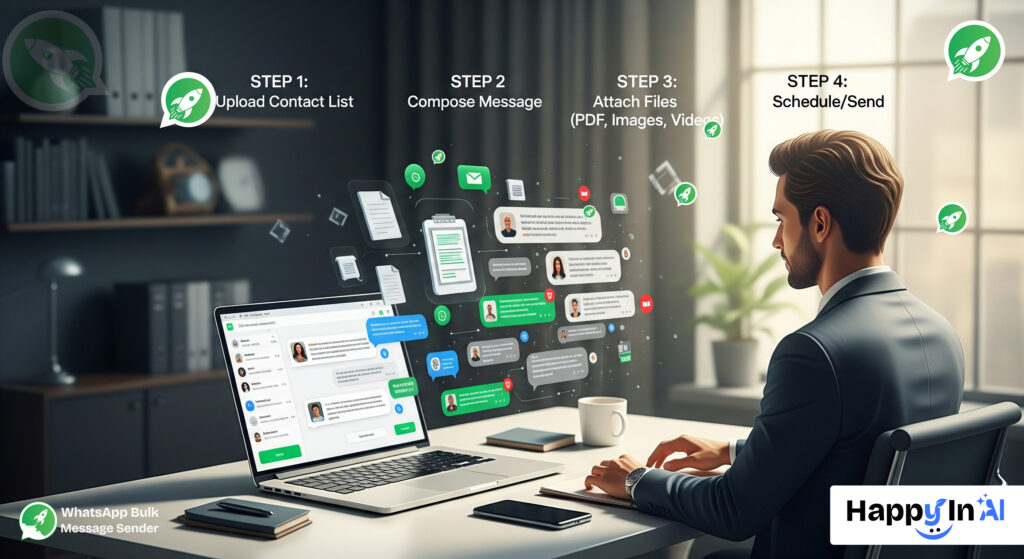 Attempting to send bulk attachments manually is not only tedious but also risky. Rapid, repetitive actions can easily be flagged by WhatsApp’s anti-spam systems. This is why a specialized tool is essential.
The HappyInAI WhatsApp Bulk Message Sender is a Chrome extension designed to automate this process safely and efficiently. While its core strengths lie in personalized text messages using CSV data and a random delay timer to protect your account, its framework is perfect for handling attachments. A robust bulk sender allows you to attach a file once and have it sent out with every personalized message in your campaign, saving you countless hours of manual work.
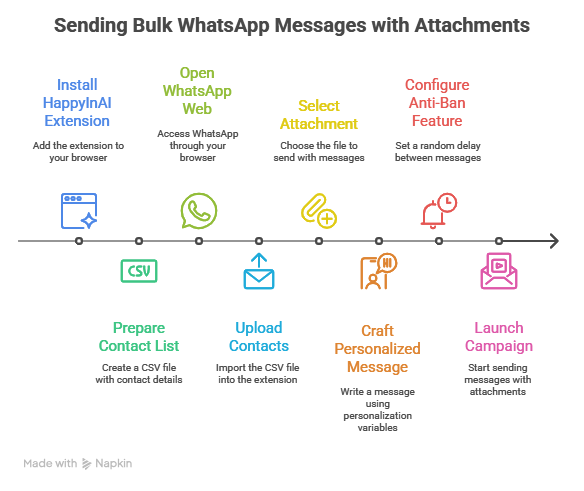
Let’s walk through the exact process of launching a multimedia bulk message campaign from start to finish.
First, you need to equip your browser with the right tool.
Your CSV file is the brain of your operation. It holds the contact numbers and the data for personalization.
This is where the text and media come together. In the HappyInAI interface:
Your text message should provide context for the attachment. Use the personalization variables that match your CSV headers to make each message feel personal.
Example for a restaurant sending a new menu:
Hi {{name}}! 👋
Great news! We’ve just launched our new seasonal menu. We’ve attached it as a PDF for you to check out.
We’re offering a 15% discount on your first order from the new menu this week!
Hope to see you soon,The Corner Bistro
This message greets the user by name, explains what the attachment is, and provides a compelling reason to open it.
This is the most important step for account safety. Do not skip it.
With your contacts loaded, your attachment selected, your message written, and your safety delay set, click the “Send Message” button.
The HappyInAI extension will now take over, sending each personalized message along with the attached file, one by one, respecting the random delay you configured.
Take your WhatsApp marketing to the next level by combining efficiency with impact. With HappyInAI’s WhatsApp Contact Exporter collecting and organizing contacts is effortless, giving you the audience you need at your fingertips.
Then, amplify your campaigns using HappyInAI’s WhatsApp Bulk Message Sender , allowing you to send personalized messages and rich multimedia content safely and effectively. Together, these tools help you create campaigns that engage, convert, and leave a lasting impression, making WhatsApp marketing simpler, smarter, and far more powerful.
Start today and experience marketing that truly resonates with your audience.
Inbox, campaigns, AI and chatbots — free to start.
রাতে বা ব্যস্ত সময়ে কাস্টমারের মেসেজের উত্তর দিতে দেরি হলে বিক্রি হাতছাড়া হয়। দেখুন কীভাবে AI আপনার নিজের তথ্য থেকে বাংলায় সঙ্গে সঙ্গে উত্তর দেয়।
Read moreHow a WhatsApp AI chatbot answers customer questions day and night from your own price list and policies, in Bangla, Banglish or English, and hands the chat to your team when it should.
Read moreক্যাশ অন ডেলিভারির ফেক অর্ডার আর রিটার্নে ডেলিভারি চার্জ নষ্ট হয়। পাঠানোর আগে হোয়াটসঅ্যাপে প্রতিটা অর্ডার কনফার্ম করে নিলে কীভাবে এটা কমে, আর Steadfast, Pathao, RedX-এ কীভাবে এক ক্লিকে বুক করবেন।
Read more