হোয়াটসঅ্যাপে AI অটো রিপ্লাই: বাংলায় ২৪ ঘণ্টা কাস্টমারের উত্তর দিন
রাতে বা ব্যস্ত সময়ে কাস্টমারের মেসেজের উত্তর দিতে দেরি হলে বিক্রি হাতছাড়া হয়। দেখুন কীভাবে AI আপনার নিজের তথ্য থেকে বাংলায় সঙ্গে সঙ্গে উত্তর দেয়।
Read moreHappyInAI · Aug 15, 2025 · 7 min read
WhatsApp has become the undisputed champion of direct customer communication. For businesses looking to scale their outreach, sending bulk messages is a powerful strategy. But as you grow, you quickly hit a ceiling. A single WhatsApp number can only send so many messages before it hits sending limits or, worse, gets flagged for spam and banned.
So, how do the pros scale their campaigns safely and effectively? They don’t rely on one number; they build a fleet.
This is the ultimate guide on how to send WhatsApp bulk messages using multiple numbers. This advanced strategy allows you to increase your sending volume, mitigate risks, and segment your communication like never before. We’ll show you a safe and practical method using a smart tool like the HappyInAI WhatsApp Bulk Message Sender and a clever browser feature you might not be using.
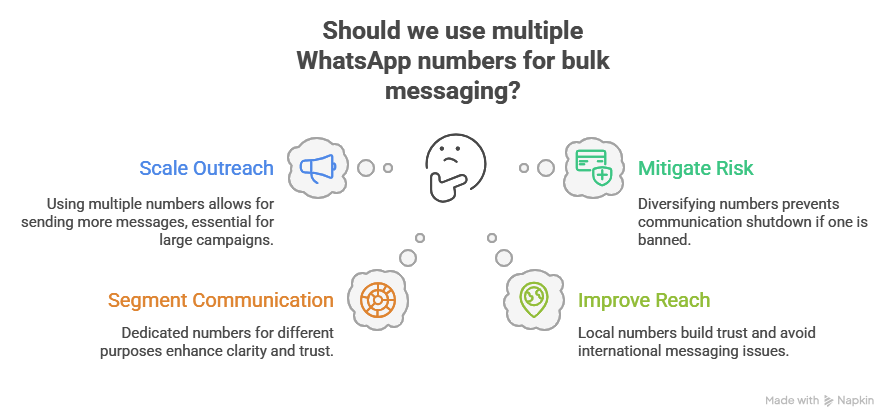
Before we get into the “how,” let’s understand the “why.” Using multiple numbers isn’t just about sending more messages; it’s a sophisticated marketing strategy with several key benefits.
A single WhatsApp account has inherent, though un-published, limits on how many new conversations you can start per day. By using two, five, or even ten different numbers, you can multiply your sending capacity proportionally. This is essential for large-scale campaigns like new product launches, massive event announcements, or city-wide promotions.
Putting all your communication efforts into a single WhatsApp number is like putting all your eggs in one basket. If that number gets flagged or banned (even temporarily), your entire communication channel is shut down.
By diversifying your sending across multiple numbers, you spread the risk. If one number faces an issue, your other numbers can continue operating, ensuring business continuity. This is the single most important reason for adopting a multi-number strategy.
A multi-number approach allows for powerful audience segmentation. You can dedicate different numbers to different purposes, creating a more professional and organized communication flow. For example:
When a customer receives a message from your dedicated “Support Number,” they immediately understand the context, leading to higher trust and engagement.
If you operate in multiple regions or countries, using a local number for each region builds immense trust. Customers are far more likely to engage with a message from a local country code than an international one. This strategy also helps avoid potential carrier issues or fees associated with international messaging.
This strategy relies on combining two powerful tools: a safe bulk messaging extension and your browser’s profile feature.

Ready to build your messaging fleet? Let’s break down the process.
First, we need to set up our isolated environments.
A new Chrome window will open. This is a brand-new profile. Repeat this process for every WhatsApp number you plan to use. You will now have several distinct Chrome profiles, each with its own desktop shortcut.
Now, we set up each profile for sending. You must repeat this for every single Chrome profile you created.
Continue until each Chrome profile is logged into a unique WhatsApp account and has the HappyInAI extension installed.
Your messaging strategy now comes into play. Instead of one giant contact list, you need to split it based on which number will be sending the message.
This segmentation is crucial. It ensures your sales messages go out from your sales number and your support messages go out from your support number.
This is the execution phase. You’ll run the process on each profile.
Now, while that campaign is running, you can switch to your second Chrome profile (“WhatsApp Support Number”), open the HappyInAI panel, upload the customer_updates.csv, compose your support message (“Hi {{name}}, your order #{{order_id}} has been shipped!”), set the delay, and click send.
You can run multiple campaigns from multiple numbers, all from the same computer, at the same time.
Learning how to send WhatsApp bulk messages using multiple numbers is the key to unlocking true scale in your direct marketing efforts. It transforms your outreach from a limited, high-risk activity into a diversified, resilient, and highly segmented communication powerhouse.
By combining the organizational power of Chrome Profiles with the safe and personalized sending capabilities of the HappyInAI WhatsApp Bulk Message Sender, you can confidently manage multiple campaigns, protect your business from bans, and build stronger, more professional relationships with your audience.
Inbox, campaigns, AI and chatbots — free to start.
রাতে বা ব্যস্ত সময়ে কাস্টমারের মেসেজের উত্তর দিতে দেরি হলে বিক্রি হাতছাড়া হয়। দেখুন কীভাবে AI আপনার নিজের তথ্য থেকে বাংলায় সঙ্গে সঙ্গে উত্তর দেয়।
Read moreHow a WhatsApp AI chatbot answers customer questions day and night from your own price list and policies, in Bangla, Banglish or English, and hands the chat to your team when it should.
Read moreক্যাশ অন ডেলিভারির ফেক অর্ডার আর রিটার্নে ডেলিভারি চার্জ নষ্ট হয়। পাঠানোর আগে হোয়াটসঅ্যাপে প্রতিটা অর্ডার কনফার্ম করে নিলে কীভাবে এটা কমে, আর Steadfast, Pathao, RedX-এ কীভাবে এক ক্লিকে বুক করবেন।
Read more